



Subtitles and voice-over in multiple languages
What's New in Armonía Plus 3.0
Now multi-platform. Faster than ever.
Armonía Plus 3.0 introduces native support for macOS (Apple Silicon) alongside Windows, bringing the same trusted workflow and project compatibility across both platforms.
Combined with significant under-the-hood performance improvements, version 3.0 delivers a more responsive experience for designing, configuring, tuning and operating even the most complex systems.
For more detailed information, please refer to the Release Note.


CONTROLLERS


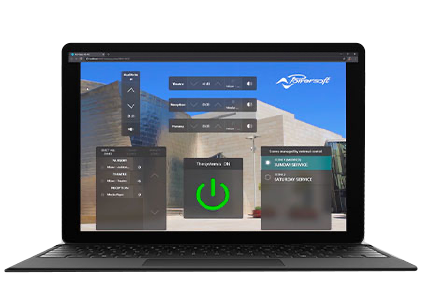

A series of control interfaces and apps are available on the Install and the Live Skins. These can be configured to control sources, levels, scenes, and zones; or to quickly recall presets that have been stored within the amplifiers. While WMP and WM Touch are limited for use within DMD and installed applications, the user can create custom control interfaces that are available for access through a web browser for any system.
From Armonía Plus to the Cloud
Every project you design and configure in Armonía Plus can become, in a single step, a live Site in MyUniverso.
From that moment on, you monitor it in real time from anywhere in the world: amplifier status, alerts and anomalies always under control, with no need to be physically on site.
Whether you're managing a single venue or dozens of locations at once, MyUniverso gives you one unified view of all your projects, with instant notifications whenever something needs your attention.
DOWNLOADS
A+ Software3
Minimum Windows system requirements:
- CPU: Intel I3 or equivalent
- RAM: 4 GB RAM
- Video adapter: 128 MB dedicated RAM
- HD: 2.5 GB available space
- OS supported: Microsoft Windows 7 64bit - Windows 8.1 64 bit - Windows 10 64bit
- Required software: Microsoft.Net 5
- Monitor resolution: 1280×720, 24-bit color
- For Ethernet connection: Ethernet card (>=100 Mbit/s), or equivalent wireless equipment (>=54 Mbit/s) (optional)
- For serial connection: RS485 port, or USB-to-RS485 adapter (optional)
- For notifications per SMS: GSM modem (optional)
- For notifications per email: Internet connection (optional)
- Compatibility does not include Windows for ARM processors
Mac OS system requirements
- Minimum - macOS 11 “Big Sur”, Apple Silicon CPU, 8 GB RAM
- Recommended - macOS 26 “Tahoe”, Apple Silicon CPU, 16 GB RAM or more
Views Host1
Firmware1
Firmware update procedure is automatic through Armonía Plus, for updating firmware manually please refer to the links below
Firmware DownloadDANTE FIRMWARE8
Dante firmware update procedure is accomplished via Dante Controller or Dante Firmware Update Manager
Audinate Dante ControllerAudinate Dante Firmware Update ManagerMEZZO SeriesDuecanali SeriesQuattrocanali SeriesOttocanali SeriesT SeriesX SeriesLegacy | Armonía Pro Audio Suite™1
For the details of the speaker preset library available in this release click here.
TUTORIALS

The latest update Armonía Plus redefines what Powersoft amplifiers are capable of, delivering a plethora of new features for sources and zones management and allowing the creation of fully customisable user interfaces and controls in the new Views Designer.